Workload Distribution
In this section we describe the main ways in which it is possible to distribute workload on job scheduling systems.
Working with Dask
Dask is one of the most modern infrastructures providing performance at scale: it is fully written in Python and interfaces nicely to job queuing systems used in HEP such as HTCondor and SLURM.
Since it could be difficult to use at first, here we try to summarize the main troubles one could face and some tips to get the most out of this tool.
Troubleshooting
Here is a collection of known possible issues that could arise when working with Dask:
KilledWorker
The reason why this happens is explained clearly in this answer. When this happens, it’s a good idea to run the analysis flow in iterative mode and a single file: in this way the real error can be seen and fixed. If this doesn’t produce any error, than the job might be using too much memory and you have to increase it.
Connect to the Dashboard
One of the nicest features of Dask consists in the possibility of monitoring the job submission through the dashboard.
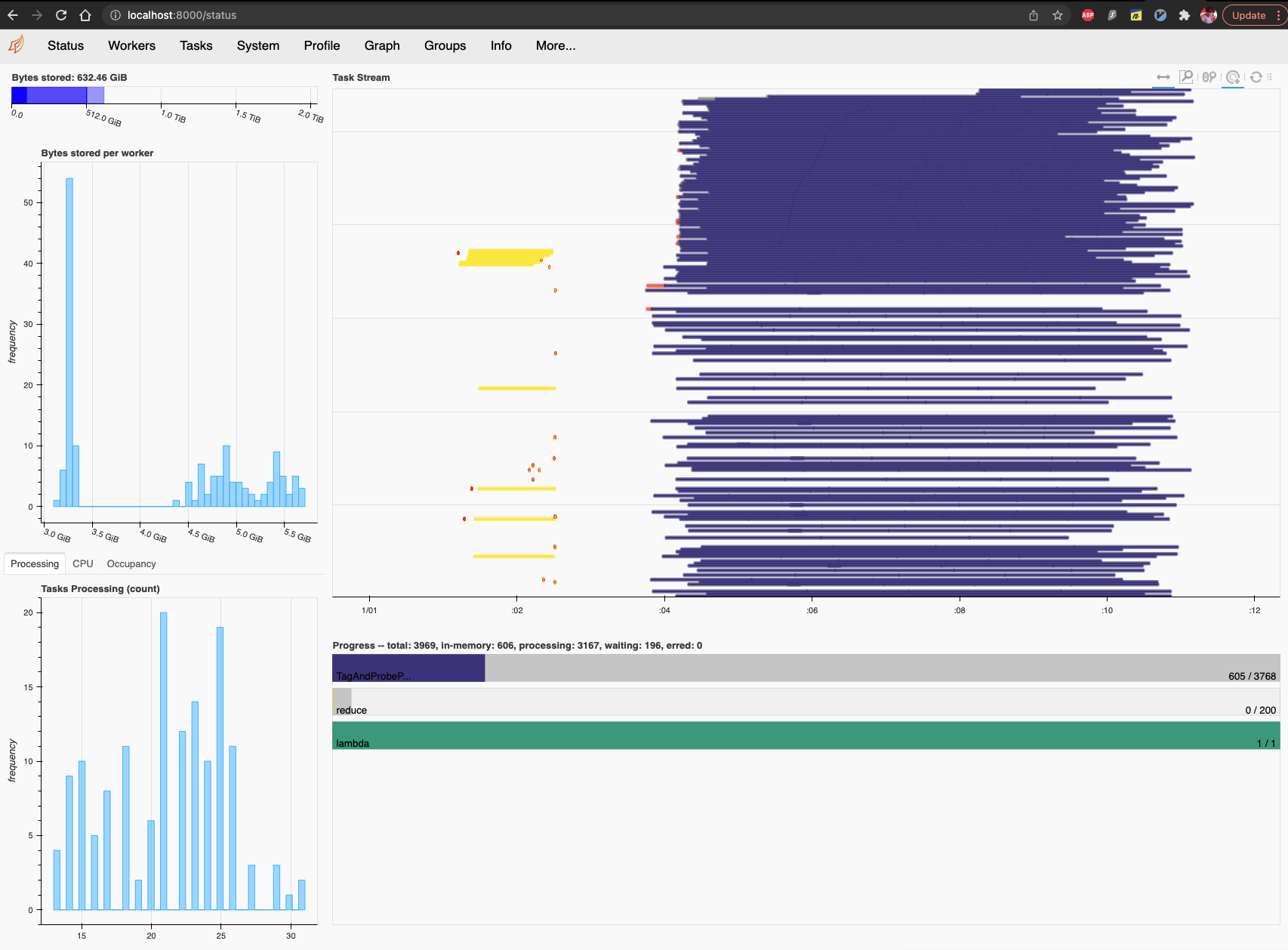
If you work on a remote cluster (so pretty much all the time) you can see the dashboard in the following way:
Find the remote port on the remote cluster
The Dask cluster you’re running remotely has the dashboard by default connected to port 8787. If this is not available, Dask will notify it when starting the cluster, like in this case:

SSH port forwarding
In order to be able to see the dashboard on your local browser, you need to connect to the remote port. Assuming that 8000 will be your local port and 8787 is the dashboard one (i.e., the one you got in the previous step), run the following:
ssh -Y -N -f -L localhost:8000:remote_address:41993 username@remote_address
where clearly
remote_addressandusernamehave to be changes accordingly.Open dashboard
In your browser, go to the following address:
http://localhost:8000/status
LXPLUS Vanilla Submitter
In order to provide an alternative to Dask to work on LXPLUS, a vanilla submitter was implemented. Being very basic and a temporary solution until Dask is mature, the distribution model is quite simple and one ROOT file is assigned to each job.
A directory called .higgs_dna_vanilla_lxplus is created in the current path, with a subdirectory with the name of the json-analysis, with a data-time suffix of the form YMD_HMS. This suffix is used to avoid overwriting previous submissions. There, two subdirectories called input and jobs are created: the former contains the new JSON files split by ROOT file, while the latter contains the submit files that are passed to condor_submit.
By default all jobs (files) for a given sample are submitted to the same cluster. You can change this behaviour by setting cluster_per_sample=False in the LXPlusVanillaSubmitter class constructor. In this case, each job will be submitted to a separate cluster.
An example of command line is the following:
run_analysis.py --json-analysis /afs/cern.ch/work/g/gallim/devel/HiggsDNA/analyses/json_analysis_file_example.json --dump /afs/cern.ch/work/g/gallim/devel/vanilla_lxplus_tests --skipCQR --executor vanilla_lxplus --queue espresso
the arguments --queue and --memory are the same used also for dask/lxplus.
Warning
When working from eos, specific care has to be taken in order correctly fetch log and error files. As explained here one can run:
condor_transfer_data $USERNAME
condor_rm $USERNAME -constraint 'JobStatus == 4' || true
to fetch logs and error files and then remove the finished jobs that otherwise would be kept showing when running condor_q.
Note
As already stated above, this submitter is just a temporary solution and it is not meant to be complete nor maximally efficient.
A smarter solution would have to be implemented as an executor directly in Coffea, and it is on the to-do list.
Getting the list of unprocessed samples
Parquet naming convention
By default, the parquet file names include the UUID contained in the ROOT file header (see header format).
However, this UUID differs from the one used in DAS, which can make it difficult to quickly identify which files have successfully been processed.
To address this, the choose_naming_convention function allows users to select the naming convention for the output files, either aligning with the DAS UUID or retaining the legacy format.
The naming convention can be specified using the self.name_convention attribute:
"DAS": Replaces the defaultROOT-specific UUID with the DAS UUID, extracted from the source.rootfile’s name. This makes it easier to match the processed files with their corresponding DAS entries."Legacy": Retains the original parquet filename format, using the UUID as contained in theROOTfile header.
How to get the list of unprocessed samples
During the workflow execution, timeouts when attempting to access the root files, and/or other issues, might result in incomplete or missing processing of certain data chunks or files.
To avoid rerunning all jobs, you can extract the list of unprocessed samples and run the workflow exclusively on those files.
The script get_unprocessed_files.py can be used to generate such list both for the DAS and the Legacy file naming convention.
The script can be called on a source directory containing all the datasets which were processed so far. It will go through the datasets as defined in the original json,
and will look into their nominal subfolder for all the missing or partially processed parquets. From there it will produce a new ouput json, which will contain the list of unprocessed samples.
Note
The script will be specifically searching through the datasets as defined in the json file.
The script can be used as follow:
python get_unprocessed_files.py --convention myconvention --source ./run3_analysis/my_processed_datasets/ --json my_samples.json --output my_unprocessed_samples.json
where --convention is used to specify the naming convention used (options are DAS or Legacy), --source should point to the directory containing the datasets, --json should be the json for which we wish to obtain the missing parquets, and
--output will be the newly produced json file.
Warning
This script works best with the DAS parquet naming (see previous section).
For the DAS convention, the script uses dasgoclient to retrieve the DAS UUID in a single query, and compares it to the available parquets.
On the contrary, the UUID for the Legacy convention is retrieved from the ROOT file headers, which we read using xrootd.
This method is not only prone to the traditional xrootd errors but is also slower, as each header must be read individually.